Transcription and subtitle tools for audio, video, and YouTube
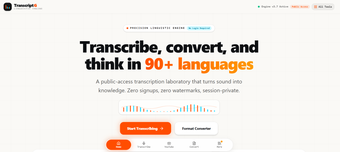
TranscriptG is a free utility app that processes audio and video into transcripts, subtitles, and other text-based content. It supports more than 90 languages and includes tools for translation, summarization, and subtitle conversion. With no registration or downloads required, it suits anyone who needs quick transcription or text processing in one place.
Handling transcripts from start to finish
TranscriptG fits into the workflow for working with recorded speech, starting with the file itself and moving toward a usable transcript. You can upload MP3, WAV, M4A, OGG, MP4, or MOV files up to 25MB, with start and end timecodes generated alongside the transcript. If the material is already transcribed, you can instead paste SRT, VTT, or TXT content.
Once that part is done, the same tools cover several related tasks. You can process YouTube videos, use a synchronized player, create chapter breakdowns, and reconstruct speech when creator subtitles are unavailable. It also produces summaries, action items, translations, and formatted documents, which you can export as SRT, VTT, TXT, JSON, PDF, DOCX, or Markdown. However, the 25MB upload limit can restrict longer recordings.
Useful for shorter files
Overall, TranscriptG covers a fairly broad set of transcription and text-processing needs without requiring separate software. Support for 90+ languages, common subtitle formats, YouTube content, and several export options gives it practical flexibility. It is best suited to users working with shorter recordings and subtitle files, while larger source files may require a different workflow.